

Customer satisfaction for service businesses

Know how every job went

HeyHappy asks your customer one simple question by text or email — when a ticket or job closes, or from a QR code on the invoice — so you can step in when someone's unhappy and know exactly which tech earned the praise. No heavy survey tool to run.

14-day free trial · No credit card to start · Plans from $49/month

Built by an MSP that runs it every day — works with ConnectWise and ServiceTitan, or on its own.

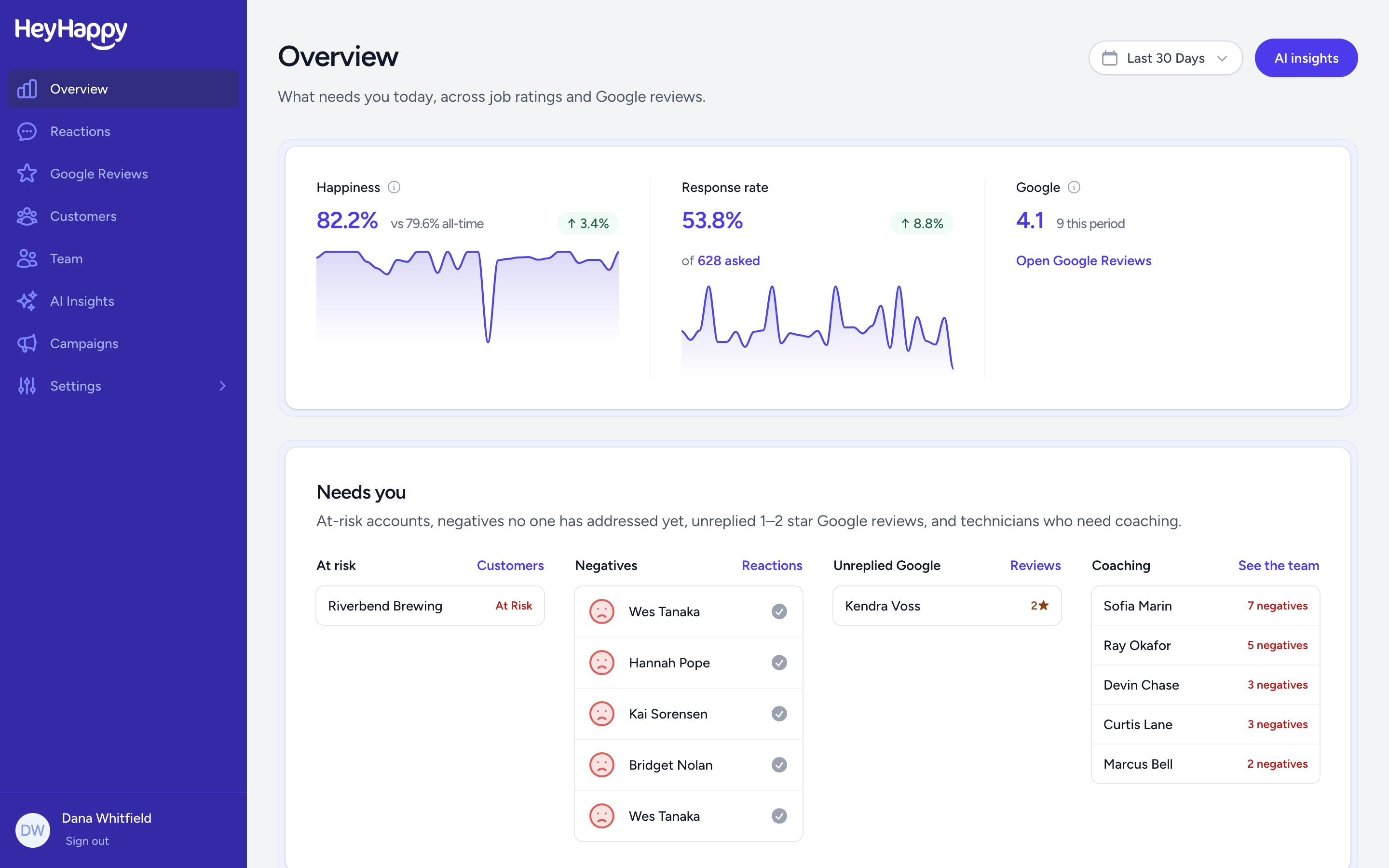
HeyHappy dashboard showing happiness, response rate and Google rating, with a Needs you list of at-risk accounts, unaddressed negative ratings, unreplied Google reviews and technicians to coach

How it works

Set it up once, then HeyHappy handles the asking — from finished work to a clear customer signal you can act on.

Step 1

Pick how you'll ask

Connect ConnectWise or ServiceTitan so every closed ticket or job asks on its own — or skip the integration and use your own feedback link and QR code.

Step 2

Let HeyHappy ask for you

One question, three faces, by text or email. It goes out when the work is done — on your timing, with nobody on your team having to remember.

Step 3

Collect Google reviews

Customers who answer happy are invited to leave a Google review right then, while the good visit is still fresh.

Step 4

Work the "Needs you" list

Your dashboard opens on the accounts slipping, the unhappy ratings nobody has answered, and the techs who need coaching. Mark each one addressed as you clear it, and every Monday an email sums up what customers kept saying all week.

What your customer sees

Their whole side of it, on their own phone, whether they got a text, an email, or scanned the QR code on your invoice. No app, no login, no ten-question survey — and your logo on it, not ours.

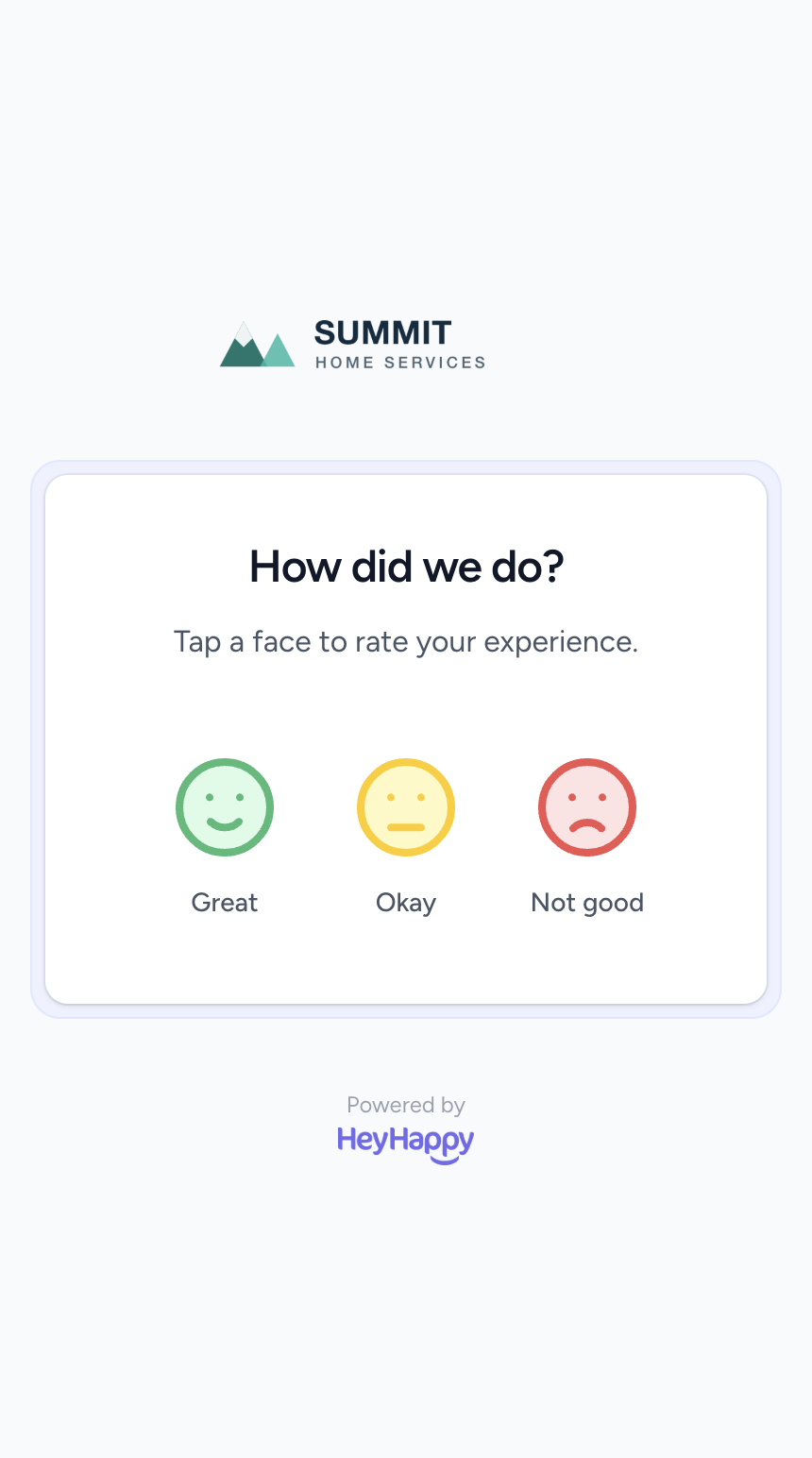
The HeyHappy feedback page on a phone, asking how did we do with three faces to tap

One tap

They scan the QR code or open the link and tap a face. That rating is saved right then, so a customer who walks away still counts.

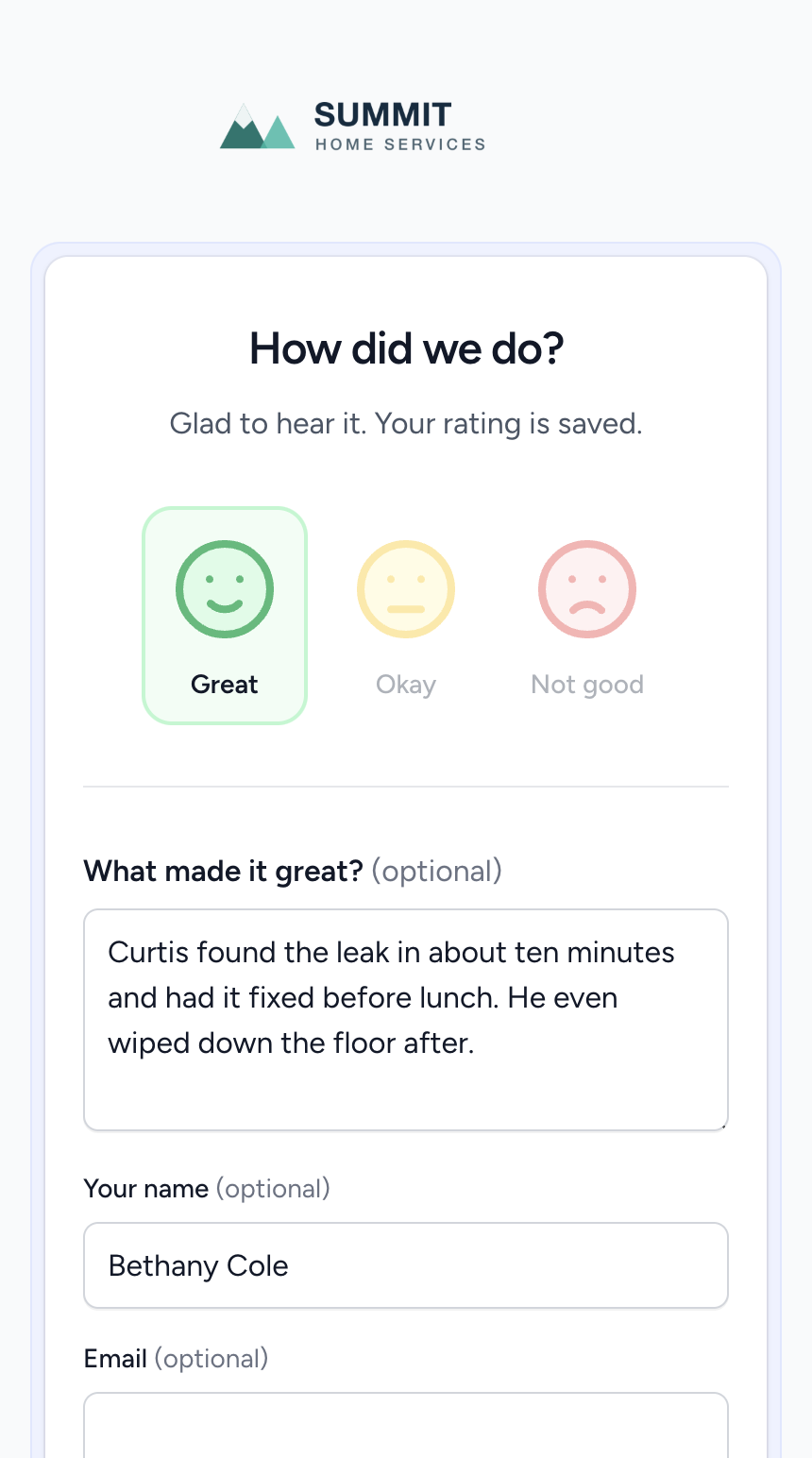
The same page after tapping the happy face, with the rating saved and an optional comment box filled in

A few words, if they want

Then one optional question, worded the way you want it. This is where you find out which tech they are naming, and why.

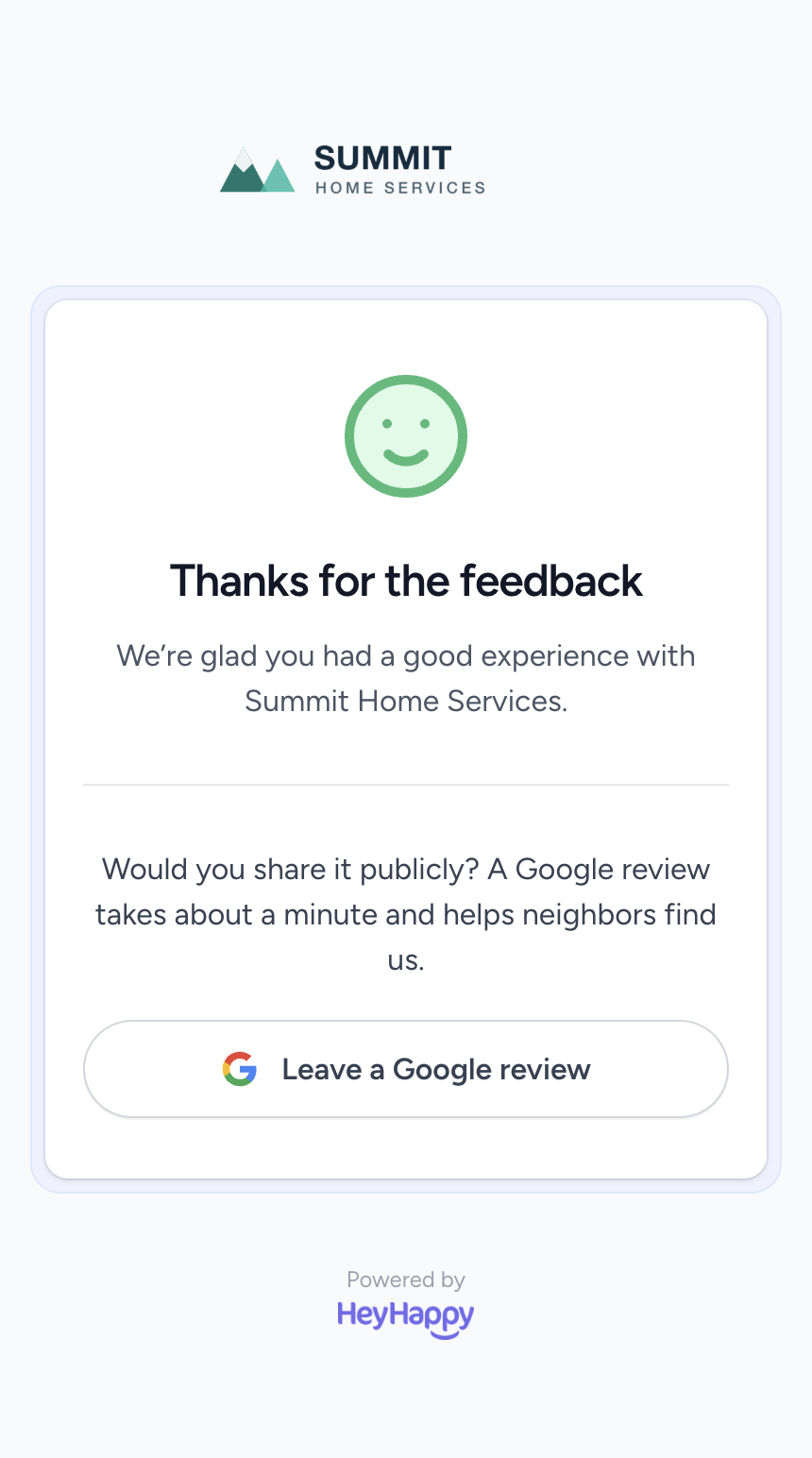
The HeyHappy thank you page inviting a happy customer to leave a Google review

Then the review

Only the happy ones are asked to say it publicly, at the one moment they are glad they called you. Unhappy ones go straight to you instead.

Ask by text, and far more people answer

A text gets read while your van is still on the drive. An email waits in a pile with everything else. Every number on this page — your happiness score, your response rate, who needs a call — depends on customers actually replying, so how you ask matters more than anything else you can change.

Your own local number
Not a shared short code. You pick the area code, so it looks like the local business you are — and replies come back to you.
We walk you through approval
US carriers make every business register before it can text. HeyHappy asks the questions in plain English, files it for you, and tells you where it has got to.
STOP handled for you
Anyone who replies STOP is off your list that second, for good, and is emailed instead. Nobody on your team has to remember who asked.
Text, email, or both
Your call, and separately for feedback and for review requests. No mobile number on file means that customer is emailed, not missed.

Texting is included in every plan up to a monthly message allowance. Approval usually takes a few days to a couple of weeks — that part is the carriers, not us.

Know where you stand with every customer

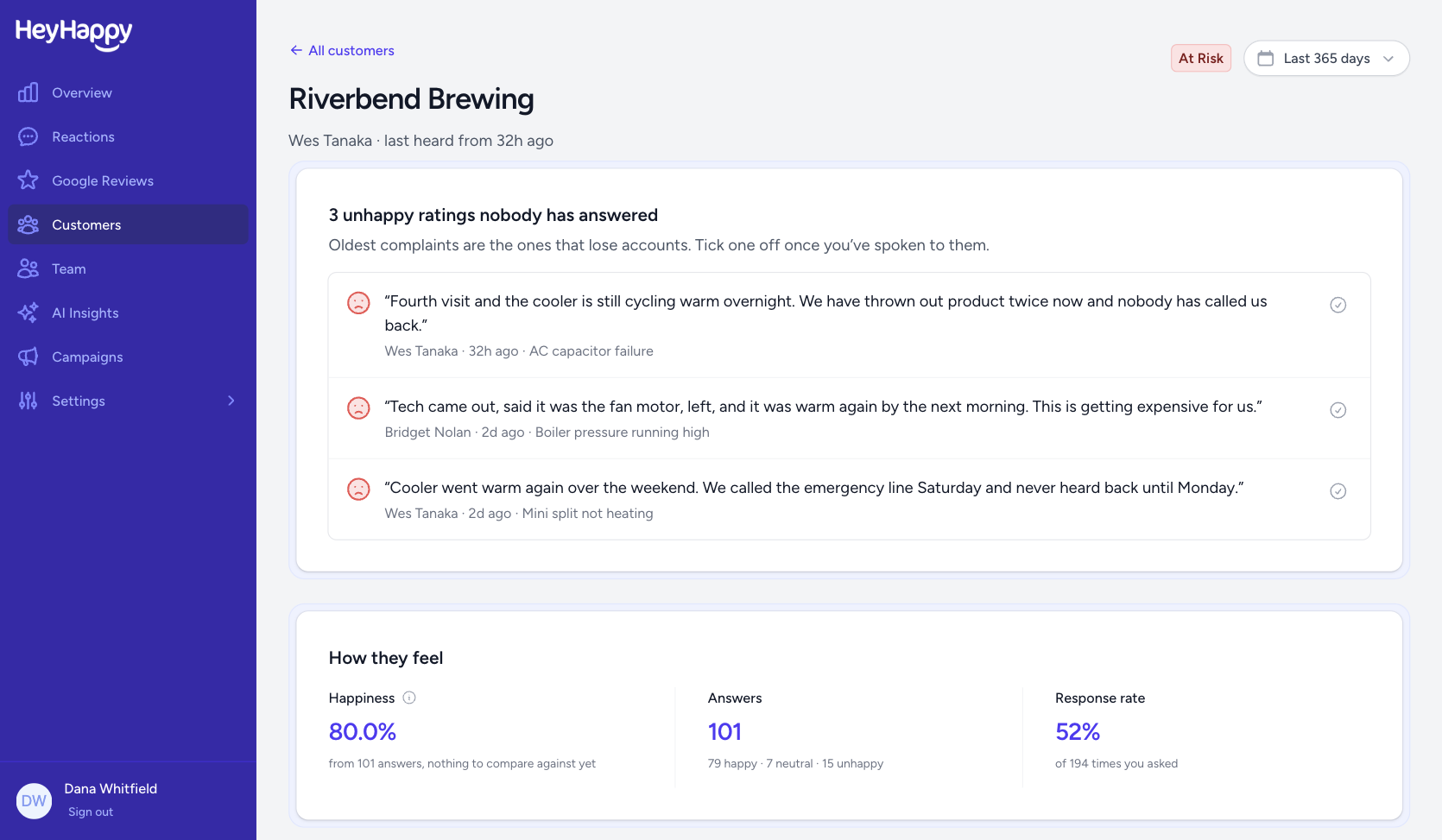
Open a customer and you have the whole relationship: how they feel, what they have been saying, and which complaints nobody has answered yet. It is the page worth reading before you renew them — or before you pick up the phone.

Who needs a call
Unhappy ratings nobody has answered, oldest first. Tick each one off once you have spoken to them.
Flagged before you lose them
Accounts slipping get marked at risk, so a quiet churn shows up while you can still fix it.
How they really feel
Happiness, how many answered, and how often they bother to — for this account, not your average.
Everything they said
Every rating and comment in one timeline, naming the tech who did the work.
A HeyHappy customer page for one account, marked at risk, listing three unhappy ratings nobody has answered with a button to mark each addressed, above the account's happiness, answer count and response rate

Integrations

Start with what you already use. More systems are on the roadmap as we expand for all service businesses.

ConnectWise
ConnectWise Manage
Ticket CSAT for MSPs and IT service teams.
ServiceTitan
ServiceTitan
Automatic CSAT after completed jobs.
Google
Google Business Profile
Turn happy customers into public reviews, then read and reply to every Google review in one place.
More coming
Additional PSA and field-service platforms.

Pricing

One price per team based on how many technicians or agents you have. Responses are always unlimited — you are never penalized for hearing from more customers. Every plan includes every feature, included up to a monthly usage allowance that ordinary use stays well inside.

Starter

$49 /month

Up to 5 technicians or agents

400 texts a month included

For small teams getting their first real read on customer satisfaction.

Start free trial

Growth

Most popular

$99 /month

6 to 15 technicians or agents

1,200 texts a month included

For growing service teams that need to spot problems before customers churn.

Start free trial

Pro

$179 /month

16 to 40 technicians or agents

3,000 texts a month included

For larger operations running multiple crews or service boards.

Start free trial

Included in every plan

  • Unlimited responses and unlimited surveys
  • Ask by text as well as email, from your own local number
  • ConnectWise, ServiceTitan, and Google Business Profile integrations
  • Automatic CSAT after tickets and jobs close
  • Your own feedback link and printable QR code, no integration needed
  • AI insights that group customer comments and cite the ratings behind them, and AI-drafted review replies
  • A "Needs you" list of slipping accounts and unanswered complaints
  • Feedback scorecards for every tech and agent
  • Customer history and account health for every customer
  • Google review requests from happy customers, and replies in one place
  • A weekly summary email every Monday morning

Every plan starts with a 14-day free trial, and you can switch between monthly and annual billing later. More than 40 technicians? Email us and we will size a plan with you.

Texting is optional, and email collection needs nothing extra. If you do want to text, there is a one-off $50 charge to register your business with the phone carriers, who charge us for it and do not refund it. Your number's monthly rental is part of your plan.

Get started on your own

Create an account, pick how you want to ask, and start collecting feedback — no sales call required.

Do I need a sales demo?
No. Start a 14-day free trial without a credit card, connect your system, and turn on CSAT yourself.
Is this only for MSPs?
No. We started with MSPs and ConnectWise, and now also support ServiceTitan for home services — with more service businesses and integrations ahead.
Do I need an integration?
No. Every team gets its own feedback link and a QR code to print on invoices, trucks, or a card you hand over — that works with no integration at all. Connecting ConnectWise or ServiceTitan just means nobody has to remember to ask.
How soon can I text customers?
Email works from day one. Texting needs the phone carriers to approve your business first, which usually takes a few days to a couple of weeks — so start collecting by email and switch texting on when it clears.
What does texting cost?
Your plan includes a monthly message allowance, and the number's rental comes with it. There is a one-off $50 charge to register your business with the carriers, who charge us for that and do not refund it. Skip texting and you pay none of it.
What if a customer replies to a text?
It is your number, so replies reach you. Anyone who answers STOP comes off your texting list immediately and permanently, and gets emailed from then on instead.
Will customers get two surveys?
If your platform already sends a built-in survey, turn that off when you enable HeyHappy so customers get one clear ask.
Can I cancel?
Yes. Start a trial, explore, and cancel anytime from billing settings.
Why did we build HeyHappy?
We wanted a simple way to understand how customers actually feel. The tools we tried felt too heavy, so we built something simpler.
Questions?
Reach out anytime at chris@heyhappy.io.